 devdevian
GitHub workspace
Browser/API 0.6.0 and CLI 0.19 alpha add a GitHub App workspace beside Devdevian conversations. GitHub sign-in and the workspace connection are separate: the existing sign-in integration does not gain repository permissions.
Connect#
- Open GitHub workspace in Devdevian, or Settings → GitHub workspace connection.
- Connect the GitHub App account. If you already use GitHub sign-in, authorize that same GitHub account.
- Choose Choose repositories, install the app and select the repositories you want it to read. Return to Devdevian and refresh.
- Select an installation/repository or enter its canonical
https://github.com/owner/repositoryURL.
The GitHub App requests read-only Contents, Pull requests, Issues, Checks, Commit statuses and Metadata. A user access token can access only resources available to both that user and the installed app. Each viewer connects independently; a project owner's installation does not grant other Devdevian members private GitHub access. Organization approval and SAML may require additional steps in GitHub.
Disconnecting removes this Devdevian connection and cancels pending authorization/refresh. It does not unlink GitHub sign-in or delete published conversations. To revoke the authorization or uninstall the app at GitHub as well, use GitHub's application settings.
Browser#
- GitHub workspace lists installed repositories, open PRs and issues, with bounded pagination.
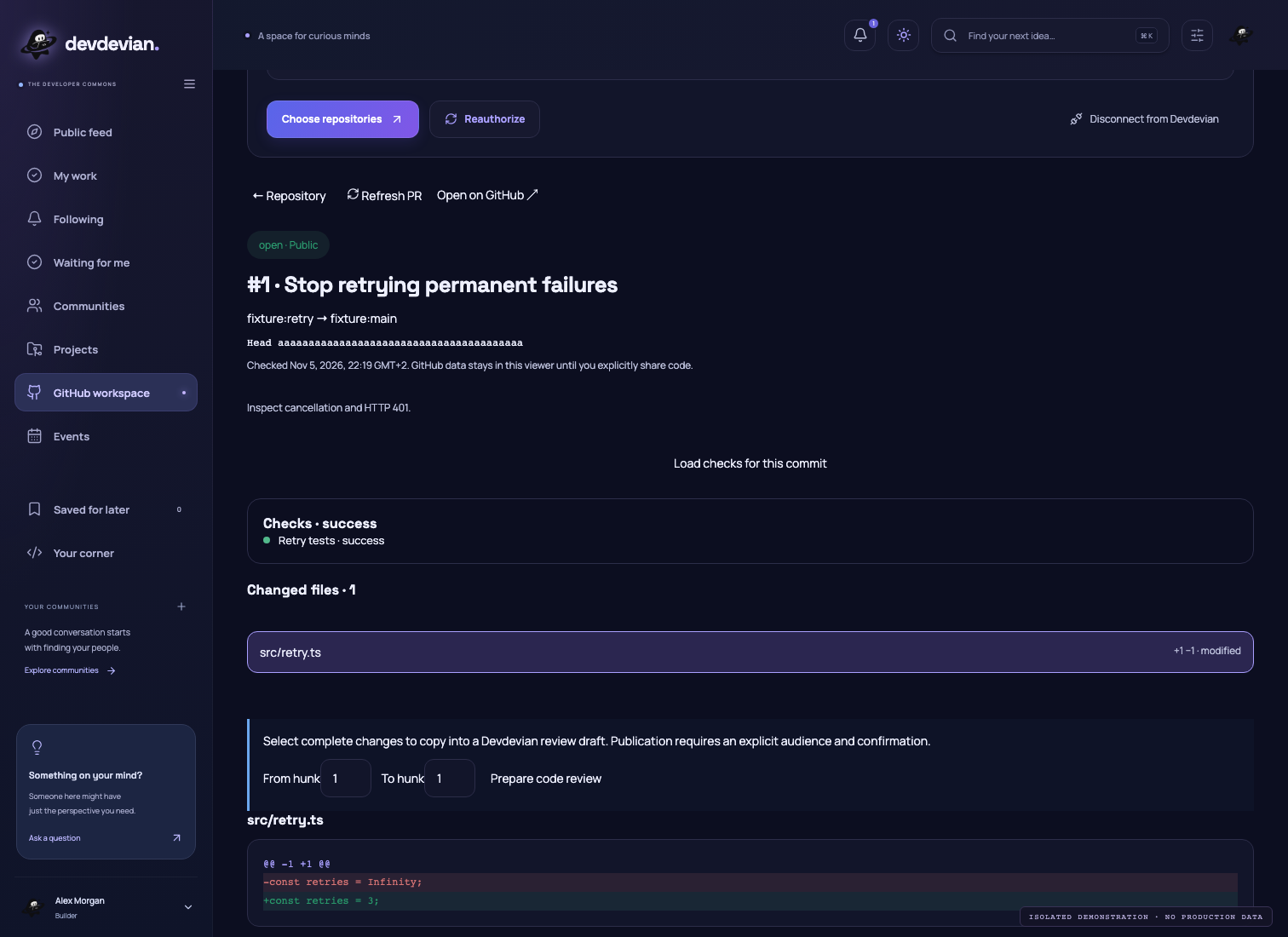
- A PR displays its branches, head/base commits, description and changed files. Choose a file to inspect complete diff hunks.
- Load checks for this commit displays check runs and combined status for the inspected head. A concurrent push requires a refresh.
- Choose a contiguous hunk range and Prepare code review to open a frozen Devdevian review draft. The code is read-only in the composer; its provenance remains tied to the selected commits and exact patch lines.
- A private PR draft requires a private community and an explicit sharing checkbox. This action saves a copy in Devdevian: every approved member of that chosen community can read it, including members without GitHub repository access. Closing the viewer alone never publishes GitHub content.
- Projects have a GitHub workspace tab. The project owner can explicitly link a repository using a version-checked confirmation. Private repositories require a private community project; viewers still authorize their own GitHub access.
Verified webhooks record only repository change generations, not PR bodies, patches or secrets. An active visible browser repository checks its generation about every 45 seconds and refreshes after changes. Hidden tabs do not poll; errors retain an explanation and require reconnecting/refreshing as appropriate. Inspecting a diff brackets its file fetch with matching head/base commits. Reading checks also verifies the head has not moved. These checks detect concurrent changes; GitHub does not provide an atomic multi-endpoint snapshot.
Checks show the first 20 results; GitHub remains the complete source when more are available. File pages contain 20 entries, up to GitHub's 3,000-file boundary. Missing, binary, oversized and incomplete patches cannot be selected for review.
Terminal#
devdevian github connect
devdevian github status
devdevian github installations
devdevian github repositories --installation ID
devdevian github pulls --repository https://github.com/owner/repository
devdevian github issues --repository https://github.com/owner/repository
devdevian github pr PR_URL --connected
devdevian github diff PR_URL --connected --file src/retry.ts
devdevian github checks PR_URL
devdevian github review PR_URL --connected --file src/retry.ts --hunks 1 \
  --title "Review retries" --topic web --body "Check cancellation." \
  --focus "Inspect the retry boundary" --community COMMUNITY_ID
--connected uses the Devdevian server gateway and your GitHub App access. GitHub credentials never reach the CLI. Existing public github pr/diff commands continue to work without a forum login when --connected is omitted. --json, --page and the existing explicit publication confirmation remain available.
In the live workspace use GitHub workspace, /github, /github REPOSITORY_URL or /connected-pr PR_URL. Enter moves from installation to repository to PR. Existing file/diff/hunk controls and multi-file review baskets work for connected PRs. X / Ctrl+K offers repository issues, browser connection and checks for the inspected commit. Private source markers survive local drafts and baskets; public publication is rejected in the client and the user must select a private community explicitly. The preview explains that sharing creates a saved community copy.
Active terminal PR/issue lists and connected PR overviews refresh through the existing serial, idle-aware live loop. Diff selection and editing stay frozen. Disable live reads with the existing preference or --no-live.
Security and limits#
- Authorization uses account- and browser-bound, one-use state plus PKCE. Pending callbacks cannot restore a connection cancelled during authorization.
- Expiring access/refresh tokens are encrypted with AES-256-GCM and user-bound authenticated data. Refresh rotation uses a durable lease and version check; disconnect/reconnect cannot be overwritten by an older refresh.
- Repository reads use the user's GitHub App token. The gateway permits only explicit repository/PR/files/issues/checks/status GET resources on
api.github.com, refuses redirects and caps responses at 2 MiB with request deadlines. Arbitrary URLs, GitHub writes and token query parameters are rejected. - Provider reads are limited to 200/account per five minutes. A gateway resource typically checks repository access before reading the selected resource. GitHub quotas also apply.
- Private provider responses are not placed in a shared server cache and API responses use
no-store. CLI viewer caches are account/client scoped and bounded; explicit refresh clears them. An already viewed or explicitly shared snapshot is not a live GitHub access grant. - Webhooks require an HMAC-SHA256 signature over the original request bytes, deduplicate delivery IDs and reject conflicting retries. Payloads are capped at 1 MiB; no unverified event can revoke credentials or update generations.
- Account deletion removes the connection and pending authorization. Encrypted application backups deliberately omit GitHub connections, pending OAuth state and delivery deduplication records. Restoring a backup requires users to reconnect GitHub; published Devdevian review snapshots remain ordinary access-controlled application data.
This release reads GitHub and publishes explicitly selected work into Devdevian. It does not comment on, approve or merge GitHub PRs. GitHub writeback would need additional App permissions and a separate confirmation flow.
Operator setup#
Register a public GitHub App with:
- Homepage: the production origin.
- Exact callback:
/api/github/callback, without wildcard matching. - Setup URL:
/app#github; leave request-authorization-during-installation and device flow off. Devdevian starts its own state-bound browser authorization. - Webhook:
/api/github/webhook, active, SSL verification enabled, with a strong shared secret. - Read-only permissions listed above; subscribe to pull_request, issues, check_run, check_suite and status. GitHub also supplies installation/authorization lifecycle events.
Configure server-only GITHUB_APP_CLIENT_ID, GITHUB_APP_CLIENT_SECRET, GITHUB_APP_SLUG, GITHUB_APP_WEBHOOK_SECRET (32+ characters), GITHUB_APP_TOKEN_KEY (32 random bytes, hexadecimal) and the existing APP_URLThe public application origin used for links and authentication redirects.. Keep the existing GITHUB_CLIENT_* sign-in settings separate. Changing the encryption key requires reconnecting existing users.
Back up and verify restoration before node scripts/migrate.mjs --prepare-github-app; the manual backup workflow offers github-app after verified archive upload. This prepares optional GitHub App schema v1 and preserves global schema v7. An unprepared or unconfigured server keeps existing application features available and reports the workspace as unavailable.
Tests use synthetic credentials and isolated provider responses. A real deployment still requires a real account authorization, installation and provider read after configuration. Check GitHub Recent Deliveries for signed webhook delivery, including redelivery of an initial ping sent before the endpoint was deployed.
Official references: user access tokens and resource intersection, GitHub App registration, webhook validation.
Tasks and contributions#
Browser/API0.7 and CLI0.20 add issue import, task PR links and contribution revision associations. Private projects choose their community at creation; public projects cannot receive private GitHub copies.