 devdevian
Review Flow
Source milestone: browser/API 0.3.0, CLI 0.16.0-alpha.1. Deployment and npm publication are separate operational steps.
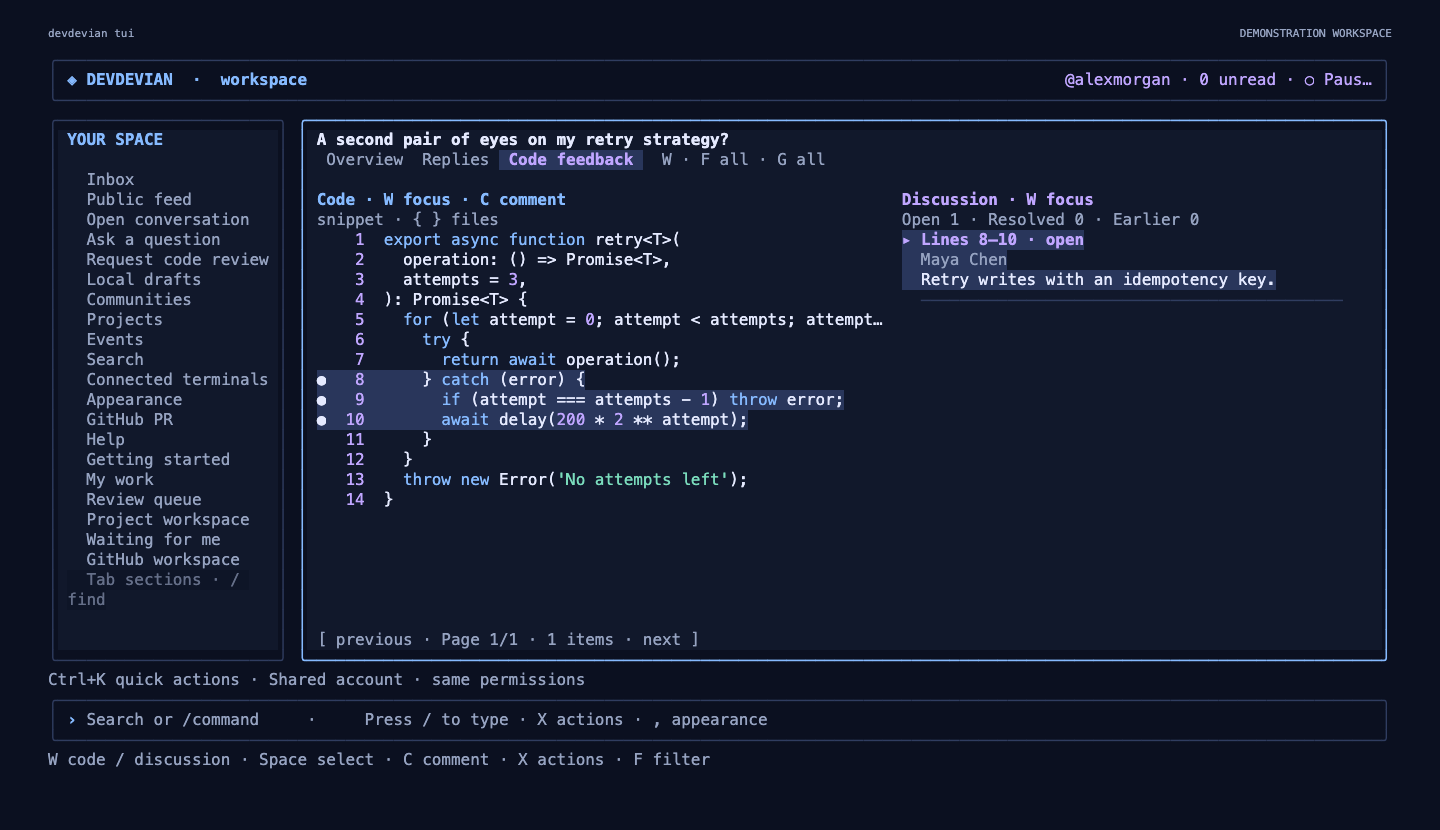
Review Flow connects a named reviewer, an immutable code revision and an explicit outcome across the browser and CLI. It extends Workspaces; ordinary conversations, feedback resolution and accepted solutions keep their existing behavior.
− retryForever(task)+ retry(task, { attempts: 3 })Publishing a new revision does not silently resolve old remarks or move an outcome to different code.
Browser workflow#
- Open your code review and choose Request a reviewer. Enter their public
@username, inspect the preview and confirm. A private conversation requires their existing approved community membership; an invitation grants no access. - The reviewer opens Waiting for me in navigation, accepts or declines, and inspects View assigned code. In review, Sent and History separate accepted, outgoing and finished requests.
- After accepting, the reviewer can Share review outcome: Changes requested or No objections, with a written explanation. Preview and confirm before publication.
- When the author shares another revision, earlier outcomes remain visibly attached to their original version. An older remark offers Address in current revision: describe the change, preview the exact revision/remark pair and confirm. This records a link; it does not resolve the remark.
- A project's Review activity shows events only for its currently linked work requests that the viewer can read.
An outcome is immutable and refers to the exact assigned snapshot, even when two snapshots contain identical code. “No objections · v1” is never approval of v2. Authors resolve remarks and accept solutions through the existing separate actions. A reviewer can decline an accepted request to withdraw; the author can cancel a pending/accepted request.
Terminal workflow#
Use /assigned for your queue; left/right switches Waiting / In review / Sent / History. Enter opens the selected request's review flow. X offers actions permitted for that request; Enter from a reviewer list opens the assigned code. /reviewers POST_ID, /invite POST_ID @username, /flow-links POST_ID and /review-activity PROJECT_ID open related views. Outcome/invitation/link forms use Ctrl+S for preview and a separate confirmation for publication.
Script commands:
devdevian assigned --section waiting --page 1 --json
devdevian review requests POST_ID
devdevian review invite POST_ID --username reviewer --body "Please inspect retries."
devdevian review accept POST_ID REQUEST_ID
devdevian review decline POST_ID REQUEST_ID
devdevian review cancel POST_ID REQUEST_ID
devdevian review outcome POST_ID REQUEST_ID --verdict changes_requested --body "Handle permanent failures."
devdevian review links POST_ID
devdevian review link POST_ID --snapshot SNAPSHOT_ID --remark REMARK_ID --body "Permanent errors now stop retries."
devdevian workspace activity PROJECT_ID
Writes capture request/post versions and snapshot IDs before the confirmation. A conflict requires a refresh and another intentional action; the client never automatically retries a write. --yes explicitly bypasses interactive confirmation, as for existing CLI publication commands. On servers without Review Flow preparation, these operations report an unavailable capability while existing commands continue working.
Permissions and bounds#
- Only the post author invites/cancels; only the assigned reviewer accepts/declines/publishes an outcome. Public-profile lookup is by exact username. Self-invites are rejected.
- Read visibility comes from the parent conversation and current community membership, including queues, pagination totals, notifications and project activity. Credits and project links grant no permissions.
- Removed reviews are unavailable. Archived/locked reviews remain readable but reject these writes.
- At most five active requests and 100 lifetime invitations per review; one invitation per reviewer/snapshot, including completed/cancelled requests. Re-requesting requires another revision; a declined request also has a 24-hour cooldown. Authors have a ten-invitation/ten-minute budget.
- Revision links require a retained older remark and a newer snapshot from the same review. At most 20 links per snapshot and 30 attempts per author/five minutes. Original feedback and its resolution state are preserved.
- New review notifications are in-app, respect Review requests and outcomes and the master notification setting, and do not send email.
Server preparation and recovery#
The global schema remains v7. Review Flow has an additive review_flow_schema marker (version 1), separate tables, indexes and immutable-update guards. Request startup probes readiness and performs no repair/DDL on an existing v7 database. Unprepared Flow routes return JSON 503 with capabilities.review_flow: 0; existing features remain available.
For an operator-selected environment, after an encrypted backup and restoration verification:
node scripts/migrate.mjs --prepare-review-flow
Preparation is repeatable and does not reset data or advance the global marker. It refuses a newer Review Flow marker. Full explicit migration also prepares the feature. The backup workflow's manual workspace_action=review-flow performs verified backup and archive upload before preparation; scheduled backups do not migrate. Restart/redeploy the new API after preparation because readiness is captured per process. Old application instances safely ignore the additive tables.
Encrypted backups include requests, outcomes, links, events and immutable guards. Restore drills use disposable databases and omit sessions. Rolling back application code leaves the tables intact; old writers do not generate new Flow events, and old outcomes stay attached to their original snapshots.
Verification#
tests/review-flow.test.mjs checks roles, stale writes, duplicate invitations, private-access revocation, notification opt-out, paused reviews, target pagination, immutable outcomes, preparation/future-schema guards and encrypted restoration. tests/review-flow-cli.test.mjs drives script commands against real isolated accounts. The CLI PTY suite covers acceptance, preview/confirmation, exact old-snapshot outcomes and compact rendering. node scripts/review-flow-browser-check.mjs exercises the multi-account lifecycle, contextual revision linking and desktop/tablet/mobile layouts. The load fixture includes scoped assignment and project-activity reads.